Large Button Water Reminder App for iPhone
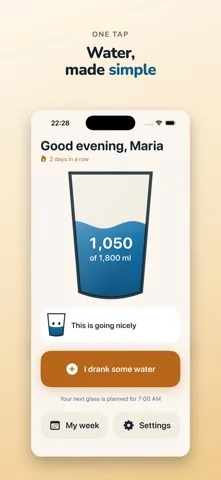
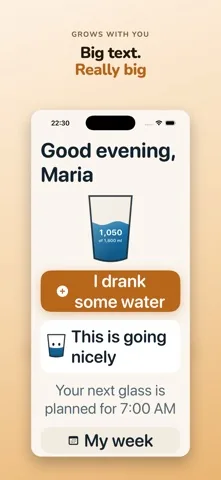
Plenty of apps describe themselves as having large buttons. Here are the actual measurements, so you can compare them with anything else.

 Free on the App Store.
The measurements
| Element | In Sip | Apple's stated minimum |
|---|---|---|
| Main button, I drank some water | 92 points tall | 44 points |
| Every other control that matters | At least 60 points | 44 points |
| Body text | The iOS title3 size | The iOS body size |
| Smallest text allowed anywhere | The iOS callout size | No floor |
Points, not pixels. A point is the unit iOS lays out in, so these sizes hold on every iPhone screen rather than shrinking on the small ones.
Why a bigger button is not simply a bigger button
Enlarging a control without changing anything else pushes the next one closer, and a crowded screen of large buttons is harder to use than a calm screen of ordinary ones. Three things carry the size in Sip.
- One action per screen. The home screen has a single thing to press. Everything else is a way out of it.
- Room around each control. Spacing grows with the buttons, so a near miss lands on nothing rather than on the wrong thing.
- Text that wraps instead of shrinking. At the largest iPhone text size the labels take a second line. Nothing is truncated and nothing is scaled down to fit.
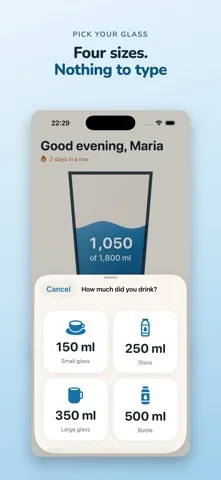
The drink sheet: four buttons, no typing
Recording a glass never involves a number pad, a slider or a wheel. The sheet holds four buttons, each with the amount in figures, the name in words, and a symbol.
- 150 ml, small glass
- 250 ml, glass
- 350 ml, large glass
- 500 ml, bottle
The sizes are deliberately coarse. Somebody who wants to estimate a glass to the nearest ten millilitres is not who this app is for. With Premium you can add your own vessels in steps of 50 ml, or 30 ml when the display is set to fluid ounces, up to 1,500.
The daily goal is also two large buttons
Sip never asks for body weight. That would mean a text field, a health figure, and a precision the app does not have. Instead there are three starting goals, 1,500, 1,800 and 2,200 millilitres, as three large buttons, and the exact number stays freely adjustable afterwards with two more.
See the sizes
Common questions
How big are the buttons in Sip?
The main button is 92 points tall. Every other control that matters is at least 60 points. Apple names 44 points as the smallest sensible tap target, so the main button is more than twice that.
Can I change the glass sizes?
The four built in sizes are 150, 250, 350 and 500 millilitres. With Premium you can add your own, in steps of 50 millilitres or 30 millilitres if you work in fluid ounces, up to 1,500.
Does Sip work in fluid ounces?
Yes. The unit is chosen from your region on first run and stays changeable. Everything is stored in millilitres underneath, so switching the display never loses or rounds away what you already recorded.