Water Reminder App for Seniors
Most hydration apps are designed for people who track their training. Sip is designed for somebody sitting at a kitchen table with reading glasses on.

 Free on the App Store.
The four things that decide whether an app works at seventy
Every one of these is a number, not a feeling, and each is set in the app itself rather than left to the person to fix afterwards.
-
Type that starts large
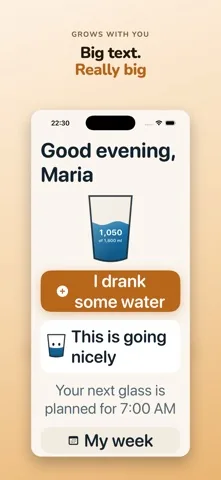
Sip sets its body text at the size iOS calls title3, one step under a heading. Most apps use the smaller body size and expect you to enlarge it yourself. Many people never find that setting, and a good many do not know it exists.
-
Buttons a shaky hand can hit
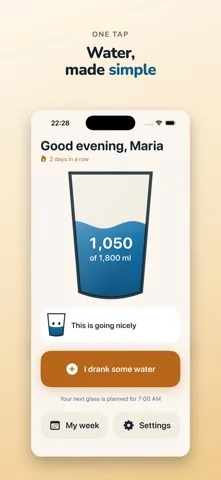
Apple names 44 points as the smallest sensible tap target. In Sip nothing that matters is under 60 points, and the main button is 92 points tall. That is not a design flourish; it is the difference between recording a glass and tapping the thing next to it.
-
Words, not just symbols
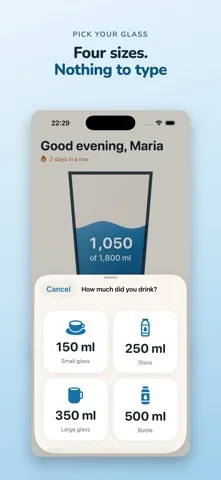
The main button reads I drank some water. Each of the four glasses carries its amount and its name next to the icon. Nothing important is signalled by colour alone, which also matters to anybody with reduced colour vision.
-
Shallow menus
The whole app is three taps deep at most. There is no dashboard, no feed, no onboarding carousel to get lost in and no place where a stray tap lands you somewhere unfamiliar.
What using it actually looks like
The reminder arrives. You open the app, the glass on the screen shows where the day stands, and one wide button waits underneath. You tap it, choose one of four glasses, and the sheet closes. That is the entire routine.
The app grows further with the iPhone text size setting. At the largest step the greeting and the button wrap onto two lines instead of being cut off, which is where a good many apps fall apart.
What Sip does not do
This matters more than the feature list if you are choosing on somebody else's behalf.
- There is no family dashboard and no way to see the progress from another phone. Sip has no accounts and no server.
- There is no Apple Watch app and no home screen widget. The reminder arrives as an ordinary iPhone notification.
- There is no iPad version, and the app runs in portrait only.
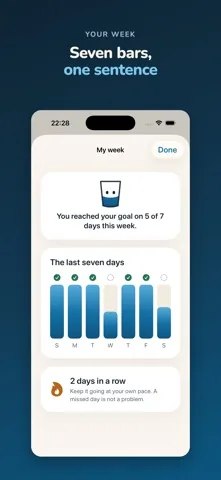
- The free version shows adverts on the week and settings screens, and one full screen advert at most once per session after the daily goal is reached. Premium removes them.
- Sip does not tell anybody how much to drink. It offers three starting goals and lets you set any amount instead.
Common questions
What makes a water app senior friendly?
Four things, in this order: text that starts large instead of text you have to enlarge, tap targets well above the 44 point minimum Apple names, buttons labelled in words rather than symbols alone, and menus that are only a few taps deep. Sip is built to all four.
Does it need setting up by somebody else?
No, but it is easy to set up for somebody. There are three questions on first run: your first name, which can be skipped, when you get up and go to bed, and which of three starting goals to use. After that it works.
Can a family member see the progress?
No. Sip has no accounts and no server, so nothing about the day leaves the phone. If you want to see how it is going, look at the week screen together. If remote visibility is what you need, Sip is the wrong app.