Made for iPhone
Water Reminder App for iPhone With One Big Button
Sip is a water reminder with type set well above the usual size, one button that says what it does in words, and reminders that stay silent at night.

 Free. iPhone with iOS 17 or later.
- No account, no email address, no password
- Works with no internet connection
- Available in 11 languages
- Free, with an optional Premium
What Sip looks like
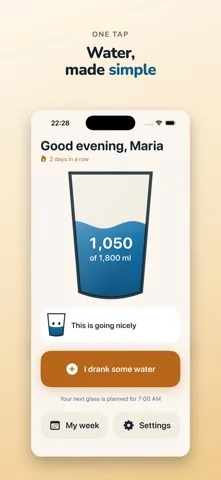
Four screens is the whole app. There is no dashboard, no feed and no weekly challenge.
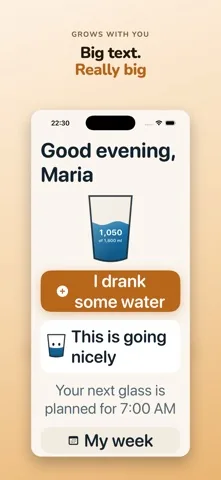
Most water apps are built for the gym. Sip is built for the kitchen table.
The difference is not a theme. It is the size of everything, the number of taps, and what the app does when you are not looking at it.
One button, and it says what it does
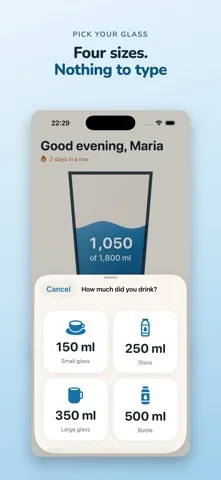
The main button reads I drank some water. Not a plus sign, not a droplet. Tap it, pick your glass, and you are done. Nothing in the app is more than three taps deep.
Large type and buttons you can hit
Apple names 44 points as the smallest sensible tap target. In Sip nothing important is under 60 points, and the main button is 92. Body text starts at the size most apps keep for headings.
Reminders that read the day
Sip waits at least 45 minutes after you record a drink, never leaves more than four hours between reminders, says nothing between your bedtime and the time you get up, and stops for the day once you reach your goal.
Nothing to sign up for
No account, no email address, no password. Your name is asked once and can be skipped. What you record is written to a file inside the app on your iPhone.
Works with VoiceOver
Buttons carry spoken labels, the daily glass reads out as a full sentence, and nothing important is shown by colour alone. Every button carries its amount and its name next to the symbol.
Who ends up using it
Somebody setting up a parent's iPhone
You install it, set the wake time, the bedtime and a goal, check that notifications are allowed, and hand the phone back. Nothing else needs doing, and nothing will ask them to log in later.
Anyone who finds health apps too busy
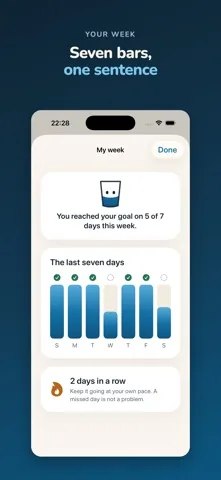
No streak pressure, no charts to interpret, no coach. The week screen is seven bars and one sentence, and a missed day is simply a shorter bar.
People who already made their phone bigger
If you use the iPhone text size setting, Sip follows it all the way. The screen still works at the largest step: labels wrap onto a second line rather than being cut off.
Free, with a Premium option
The free app is a complete water reminder. Premium is for people who want it to fit their own day more closely.
| Free | Premium | |
|---|---|---|
| Daily goal and progress | Yes | Yes |
| Glass sizes | 150, 250, 350 and 500 ml | The same four, plus your own |
| Reminders | An even rhythm through the day | Spacing that follows how far ahead or behind you are |
| History | The last seven days | All of it |
| Quiet times for a nap or an appointment | No | Yes |
| Advertising | Banner on the week and settings screens | None |
About the advertising, plainly. Sip is free because the free version shows adverts through Google AdMob. There is a banner on the week screen and in settings, never on the home screen, and at most one full screen advert per session, shown after you reach your daily goal. On first run iOS asks whether Sip may track you; saying no changes nothing about how the app works. Premium removes the advertising entirely.
Premium is available monthly, yearly, or as a single lifetime payment. Prices are shown in the App Store in your own currency before you confirm anything.
Questions people actually ask
Is Sip free?
Yes. The free app is a complete water reminder: your daily goal, four glass sizes, reminders through the day and the last seven days. It pays for itself with advertising. Sip Premium removes the advertising and adds reminders that adapt to your day, your own glasses and bottles, your full history and quiet times. Premium is available monthly, yearly or as a single lifetime payment.
Where does Sip show adverts?
There is a banner on the week screen and in settings. There is never one on the home screen, because that is where the app does its one job. At most one full screen advert appears per session, and only after you have reached your daily goal. Premium removes all of it.
Do I need an account or an internet connection?
No account, no email address and no password. Sip opens straight into the app and works with no connection at all. The only thing that needs a connection is buying Premium.
How large is the text really?
Sip sets its body text at the size iOS calls title3, one step below a heading, where most apps use the smaller body size. Every size is tied to the iPhone text size setting, so it grows further if you have already made your phone larger.
Will it go off in the middle of the night?
No. Sip says nothing between the bedtime and the wake time you set, and it stops for the day once you reach your goal. With Premium you can add quiet times for a nap or an appointment.
How much water should I drink?
Sip does not answer that, and it is not a medical device. It offers three starting goals, 1,500, 1,800 and 2,200 millilitres, and you can set any amount you like instead. If a doctor has given you an amount, use that one.
Which iPhone does Sip need?
An iPhone running iOS 17 or later. Sip is an iPhone app in portrait only. There is no iPad version, no Apple Watch app and no home screen widget.